Ant Body Parts Diagram Activity
Assignment: A fun activity for students to learn how to label and annotate diagrams using a word processor or slide presentation app.
Student learn how to insert, size and move clipart. Students learn to insert, size and move textboxes. Students learn to insert, size and move arrow shapes. These are essential skills for creating reports, brochures, presentations, posters and title pages.
Students can search the internet, or use their textbooks to find the names and locations of the main ant body parts.
Grade 2 +
Ant Body Parts - Finished Example

How to Insert Clipart 2 Step Tutorial
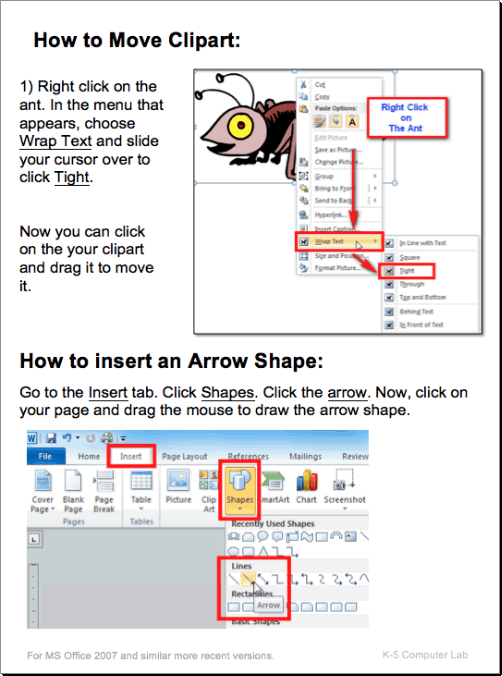
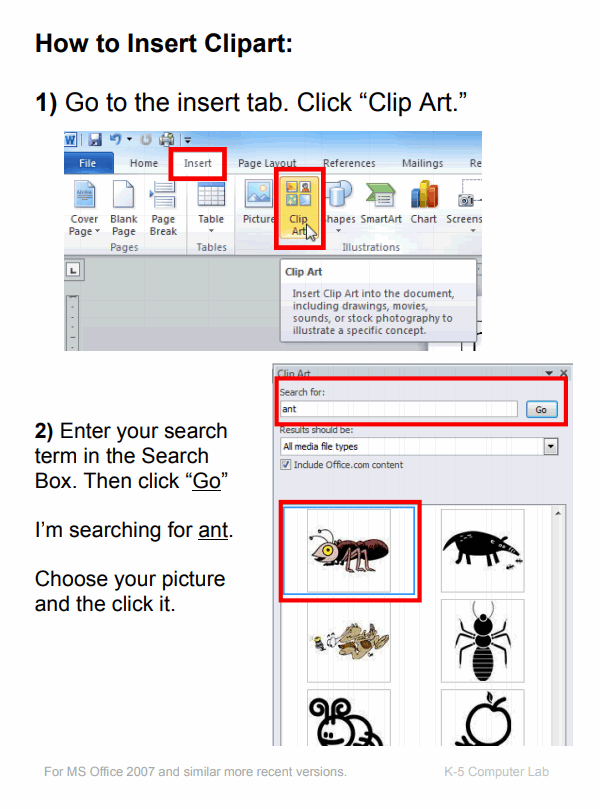
This tutorial demonstrates how to insert and move clipart, and then how to add an arrow shape. This tutorial uses a basic Microsoft word processor, but the concepts and tools are common to most other word processors and slide presentation apps.
Download: 1-how-to-insert-clipart.pdf
Step One - Insert Clipart
Download: 2-how-to-move-clipart-and-insert-an-arrow-shape.pdf
Step Two - Move Clipart